
Coming soon for iPad

Your organist’s playing.
Ready when they can’t be there.

Familiar hymns. Your arrangements.
A service your choir can sing with confidence.

Record your own musician or import authorised recordings. Prepare your Order of Service, then play it through your church speakers—with optional control from an iPhone or Android phone.

Built for church volunteersOffline music playbackNo subscription planned
Your music. Your service. Your moment.
Meet HymnReady

See HymnReady
in action.

Discover an easier way to prepare and play your church’s music.

Meet the app in our introduction, then explore the recording, preparation and playback guides below. This is a development preview; the interface may change.

Watch on YouTube
A little preparation.
A calmer Sunday.

The right hymn.
At the right moment.

When your church uses recorded music, the person pressing Play shouldn’t need to be a sound engineer.

HymnReady is being developed with real church use in mind: clear controls, an organised library and a service ready before people arrive. It supports your musicians and volunteers—and helps when a live organist isn’t available.

Inside HymnReady

Your music, organised.
Your service, prepared.

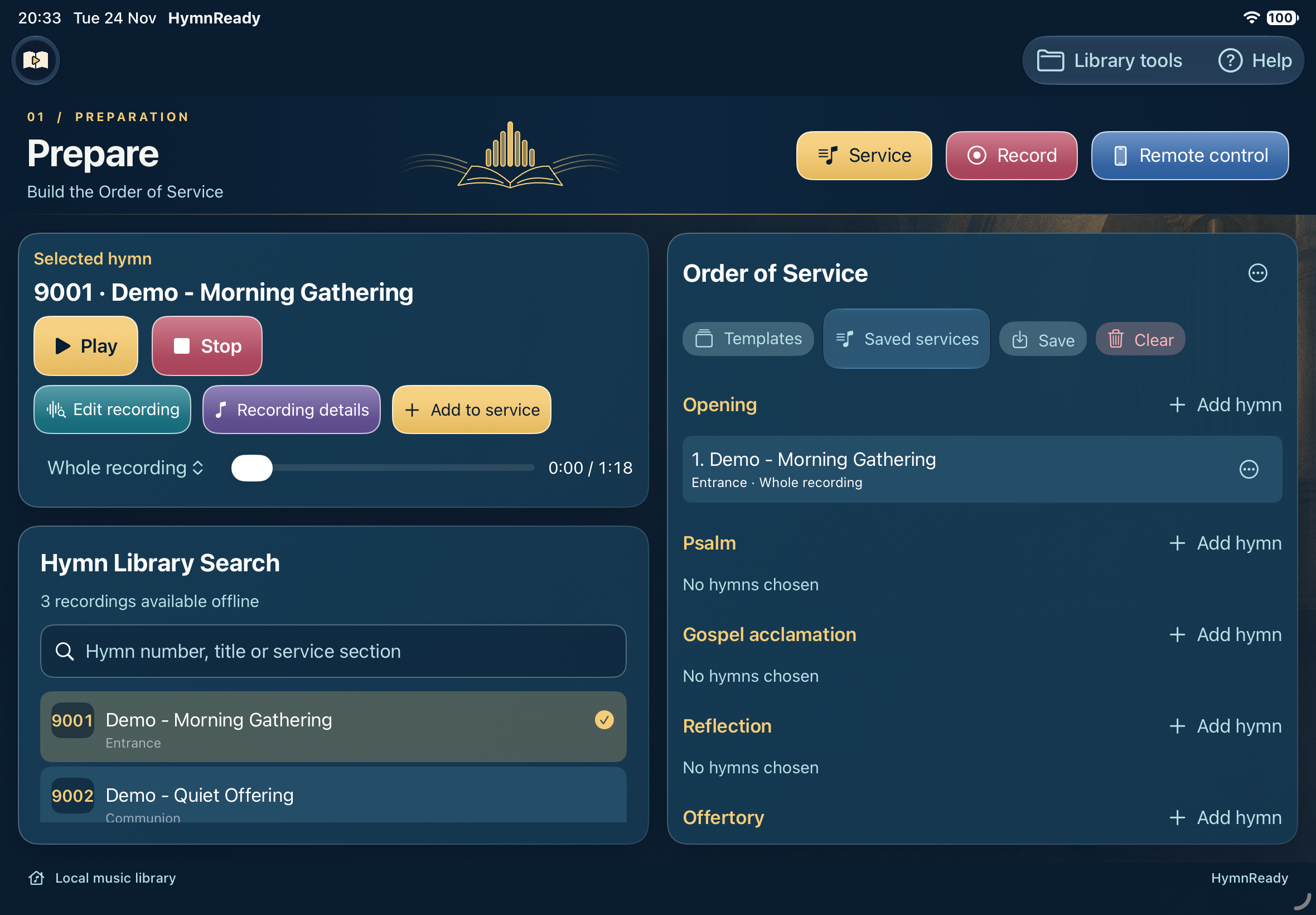
Find a recording, check it and place it in the Order of Service—all from Prepare.

Actual HymnReady beta Prepare screen showing an original demo recording, playback controls, hymn search and Order of Service
Actual beta screen, build 54, captured from the iPad simulator using the included original demos. Tap to view full size. Interface and supported features may change before release.
Request a church trial
From preparation to participation

Prepare first.
Then simply play.

Two clear modes keep the work of preparing a service separate from the moment you lead it.

Prepare

Everything in its place.

Find a hymn by number, title or part of Mass. Choose your recordings and arrange them in your Order of Service.

  • Import your own authorised recordings
  • Choose the whole recording or a reviewed verse version
  • Save a service to use again
An example Sunday Order of Service
EntranceOpening hymn
OffertoryOffertory hymn
CommunionFirst hymn · Second hymn
RecessionalClosing hymn
Mass

Be ready for the next moment.

A focused playback screen puts the current hymn and the next selection in easy reach.

  • Clear Play, Stop and navigation controls
  • See the playing hymn highlighted in gold
  • The next hymn queues ready for you to press Play

Music ready.
Mind at ease.

Designed to keep the operator in control.

The service example illustrates the workflow; it is not an app screenshot.

Control without the walk

Stay part of
the service.

Leave the iPad connected to your sound system. Control it from a compatible iPhone or Android phone.

Start, pause, stop and move between hymns using the paired remote. Wi-Fi and Bluetooth connection options are available in the development builds.

iPhone remoteAndroid remoteWi-Fi or Bluetooth

The iPad plays the audio. Bluetooth carries the controls, not the music. Pairing, range and device compatibility apply; Android testing is ongoing.

Your recordings, made useful

More than a Play button.

Practical tools for preparing the music your church already knows.

♫

A library you can find your way around

Search by hymn number, title or part of Mass. Keep familiar recordings organised and ready for different services.

Record your own organist

Capture through a compatible audio interface connected to the iPad. Check levels, name the take and add it to your hymn library—even using the remote.

Prepare verses with care

Trim unwanted audio and set verse markers. Repeated-melody analysis helps suggest verse boundaries for you to listen to and review.

Shape the sound

Adjust EQ, reverb and compression during playback. Fine-tune your recordings for your equipment and the room.

Keep services ready to reuse

Save an Order of Service and prepare the hymns for each part of Mass, including more than one for Communion.

Keep a copy of your work

Export and restore a complete library with recordings and settings. Prepare a backup before changing equipment or moving to another iPad.

Made to fit the church you have

Start with your iPad.
Connect to your sound.

You may be able to use your existing mixer and speakers. The right connection depends on your equipment.

For playback, connect the iPad’s audio output to a suitable line input. For recording, a compatible USB audio interface takes the mixer or organ’s output into the iPad.

Prepare & playHymnReady on iPad
Connect the audioSuitable adapter or audio interface
Share the musicYour mixer & church speakers

No internet needed to play recordings already imported to the iPad.

A straightforward plan

For your church.
Without a monthly bill.

We’re planning a trial-and-unlock model, so you can check HymnReady with your music, your volunteers and your sound system before deciding.

HymnReady is in development. Availability, the trial and final purchase terms are subject to the released app and App Store approval.

Planned launch offer

Try it for 30 days.

£49.99 one-off unlock after your trial
  • No subscription planned
  • No automatic payment at the end of the trial
  • Use your own authorised music
Request a church trial

Coming soon to the Apple App Store. Not available to purchase here.

Practical help for your church

From the organ bench
to your next service.

When no organist is available

A practical rehearsal-first plan for using familiar recordings without replacing the role of live musicians.

Read the playback guide

Record your church organ

Check for a suitable audio output, choose a stereo interface and build your library a hymn at a time.

Read the recording guide

Connect an iPad to church speakers

Understand the playback path, power needs and sound check before the first service.

Read the equipment guide
Help shape HymnReady

Could your church
be one of the first?

We’re looking for a small group of churches to try HymnReady and share honest feedback.

You don’t need to be technical. We want to understand what makes preparation and playback easier for real volunteers, using real church equipment.

Request a trial or ask about your equipment. James will reply personally; submitting a request does not enrol you automatically or commit you to a purchase.

Let’s talk about your church

Your request is securely recorded so James can respond. No purchase is made. We only send launch updates if you choose that option below. How we use your details.

A few useful answers

Before you
press Play.

Still have a question?
Ask James by email.

Do we need an organist to use HymnReady?

No. HymnReady plays recordings supplied by your church. It can support services where a live musician isn’t available, as well as help you organise recordings made by your own organist.

Does the church need internet access?

No internet connection is needed for local playback once recordings are imported. Downloading the app and some setup activities need internet access. Wi-Fi remote control needs a shared local network; Bluetooth remote control is an alternative.

Are hymn recordings included?

Three original organ-style demo recordings are included for trying the app. For services, build your library from your own authorised recordings. HymnReady does not include a commercial hymn catalogue or music licences.

Can we choose how many verses to play?

Yes. Identify and review the introduction, verses, any refrains and ending, then choose how many verses to use when adding the hymn to a service. A separate playback copy keeps the chosen verses and ending; your original stays unchanged. Shortened joins must be checked by listening. Saved verse-end markers alone do not identify the ending.

Can an Android phone control the iPad?

An Android companion is available for development testing, alongside the iPhone remote. Both support playback and remote recording controls. Bluetooth and Wi-Fi use the same private pairing key. Final supported devices and distribution details will be confirmed at launch.

Will it work with our mixer and speakers?

It depends on your connections. Playback needs an appropriate audio output into a line input on your sound system. Recording needs a compatible input device, usually a USB audio interface. Email the mixer model or a photo of its connections for setup guidance.

When can we buy it?

HymnReady is preparing for launch and is not yet advertised here as an approved App Store release. The planned offer is a 30-day trial followed by an optional £49.99 one-off unlock. Contact us for testing and launch information.

A service prepared.
A church ready to sing.

Request a church trial
Before your first rehearsal

Your setup checklist

For stereo recording, connect both left and right channels and check both meters. Prevent the mixer from feeding the iPad’s playback back into its recording input.

Ask about your equipment
Privacy & music rights

A straightforward approach.

This website

Trial and setup enquiries are stored securely by this website and accessed by James to respond. We collect the name, email, church and message you supply, your interest and optional launch-update preference, plus a broad campaign label when provided. We do not publish enquiries. The hosting provider processes connection logs to operate the service. See our full privacy information.

Analytics and cookies

With your permission, we use Google Analytics 4 to understand website visits, traffic sources, device types and how pages are used. Google Analytics uses cookies to distinguish visits and measure engagement; we do not enable advertising personalisation or Google signals through the website tag. Analytics is optional and the Google Analytics tag is not loaded unless you accept. A first-party preference cookie remembers your choice for six months. You can change your choice at any time using Cookie settings in the website footer. Read Google’s privacy policy for more information about how Google processes data.

The promotional video uses YouTube’s privacy-enhanced embedded player. YouTube may process information when the player is used; its own privacy policy applies.

When you email us

Your email is handled by James Brown at hymnready@ogion.co.uk to respond to your enquiry, discuss testing or provide launch information you request. Please do not send sensitive personal information. You can email the same address to ask about your information or request deletion, subject to any applicable record-keeping requirements.

Your church’s music

HymnReady is a playback and organisation tool. You remain responsible for having the rights and permissions needed to record, store and play your music. Purchasing the app does not provide licences for copyrighted compositions or recordings.

Website information updated November 2026. Final app privacy and purchase information will accompany the release.